Quickstart
Get Up and Running with PairSpaces
What You Will Do
This is a rapid onboarding guide to PairSpaces. You will create a Space and work with someone from your Space.
This guide does not require a PairSpaces account.
Setting Up
Download the PairSpaces CLI. Choose the version of the PairSpaces CLI for your operating system below.
> curl -fsSL https://get.pairspaces.io/install.sh | bash
> curl -fsSL https://get.pairspaces.io/install.sh | bash
> curl -fsSL https://get.pairspaces.io/install.sh | bash
> irm https://get.pairspaces.io/install.ps1 | iex
> pair version

3.0.0 (Latest)
> pair version

3.0.0 (Latest)
> pair version

3.0.0 (Latest)
> pair.exe version

3.0.0 (Latest)
Change to the directory that you want to work together from. PairSpaces will mount this directory in a Docker container that creates a sandbox that limits your team to the current directory.
bob@macbook my_code_project > pair with alice@pairspaces.com

This command will create a sandbox around your current directory that alice@pairspaces.com will be able to access. You can delete the sandbox at any time.

Do you want to pair with alice@pairspaces.com?

Only 'yes' will be accepted to approve.
bob@macbook my_code_project > pair with alice@pairspaces.com

This command will create a sandbox around your current directory that alice@pairspaces.com will be able to access. You can delete the sandbox at any time.

Do you want to pair with alice@pairspaces.com?

Only 'yes' will be accepted to approve.
bob@macbook my_code_project > pair with alice@pairspaces.com

This command will create a sandbox around your current directory that alice@pairspaces.com will be able to access. You can delete the sandbox at any time.

Do you want to pair with alice@pairspaces.com?

Only 'yes' will be accepted to approve.
PowerShell/CMD does not support creating Spaces.
Enter yes to create your Space.
Local Spaces require Docker to be running. When you run the command, the PairSpaces CLI checks if Docker is running.
bob@macbook my_code_project > pair with alice@pairspaces.com

Docker is not running. Please start Docker and try again.
bob@macbook my_code_project > pair with alice@pairspaces.com

Docker is not running. Please start Docker and try again.
bob@macbook my_code_project > pair with alice@pairspaces.com

Docker is not running. Please start Docker and try again.
PowerShell/CMD does not support hosting Spaces from Windows.
If Docker is already running you will see the following output.
bob@macbook my_code_project > pair with alice@pairspaces.com

Use 'pair with CODE' to join the Space.

Unable to find image 'pairspaces/local-space-image:latest' locally
build: Pulling from pairspaces/local-space-image
3b06f1cc8833: Pull complete
234a742b1fc9: Pull complete
a4e455379946: Pull complete
963d0ca7db33: Pull complete
e21d21932491: Pull complete
ca02ec9fd3e5: Download complete
Digest: sha256:2885d70fcc0d16d17ade85331056882b7663cb8f2afe5032d263d0226eb6c84f
Status: Downloaded newer image for pairspaces/local-space-image:build

Your team can connect to your Space now. Use Ctrl-C to close the connection.
bob@macbook my_code_project > pair with alice@pairspaces.com

Use 'pair with CODE' to join the Space.

Unable to find image 'pairspaces/local-space-image:latest' locally
build: Pulling from pairspaces/local-space-image
3b06f1cc8833: Pull complete
234a742b1fc9: Pull complete
a4e455379946: Pull complete
963d0ca7db33: Pull complete
e21d21932491: Pull complete
ca02ec9fd3e5: Download complete
Digest: sha256:2885d70fcc0d16d17ade85331056882b7663cb8f2afe5032d263d0226eb6c84f
Status: Downloaded newer image for pairspaces/local-space-image:build

Your team can connect to your Space now. Use Ctrl-C to close the connection.
bob@macbook my_code_project > pair with alice@pairspaces.com

Use 'pair with CODE' to join the Space.

Unable to find image 'pairspaces/local-space-image:latest' locally
build: Pulling from pairspaces/local-space-image
3b06f1cc8833: Pull complete
234a742b1fc9: Pull complete
a4e455379946: Pull complete
963d0ca7db33: Pull complete
e21d21932491: Pull complete
ca02ec9fd3e5: Download complete
Digest: sha256:2885d70fcc0d16d17ade85331056882b7663cb8f2afe5032d263d0226eb6c84f
Status: Downloaded newer image for pairspaces/local-space-image:build

Your team can connect to your Space now. Use Ctrl-C to close the connection.
PowerShell/CMD does not support running Spaces from Windows.
The PairSpaces CLI downloads a publicly-available Docker image from DockerHub. The running container mounts your current directory using the same path in the container.
What Your Team Does
Download the PairSpaces CLI.
> curl -fsSL https://get.pairspaces.io/install.sh | bash
> curl -fsSL https://get.pairspaces.io/install.sh | bash
> curl -fsSL https://get.pairspaces.io/install.sh | bash
> irm https://get.pairspaces.io/install.ps1 | iex
> pair version

3.0.0 (Latest)
> pair version

3.0.0 (Latest)
> pair version

3.0.0 (Latest)
> pair.exe version

3.0.0 (Latest)
Use the CODE shared with you to work together.
> pair with CODE

[root@7b02b5dbf2e1 my_code_project]#
> pair with CODE

[root@7b02b5dbf2e1 my_code_project]#
> pair with CODE

[root@7b02b5dbf2e1 my_code_project]#
> pair.exe with CODE

[root@7b02b5dbf2e1 my_code_project]#
After doing this, you can also connect using your IDE. We're going to use VSCode here, but the steps are similar for other IDEs.
Open VSCode's command panel and click on the command Remote-SSH: Connect to host....
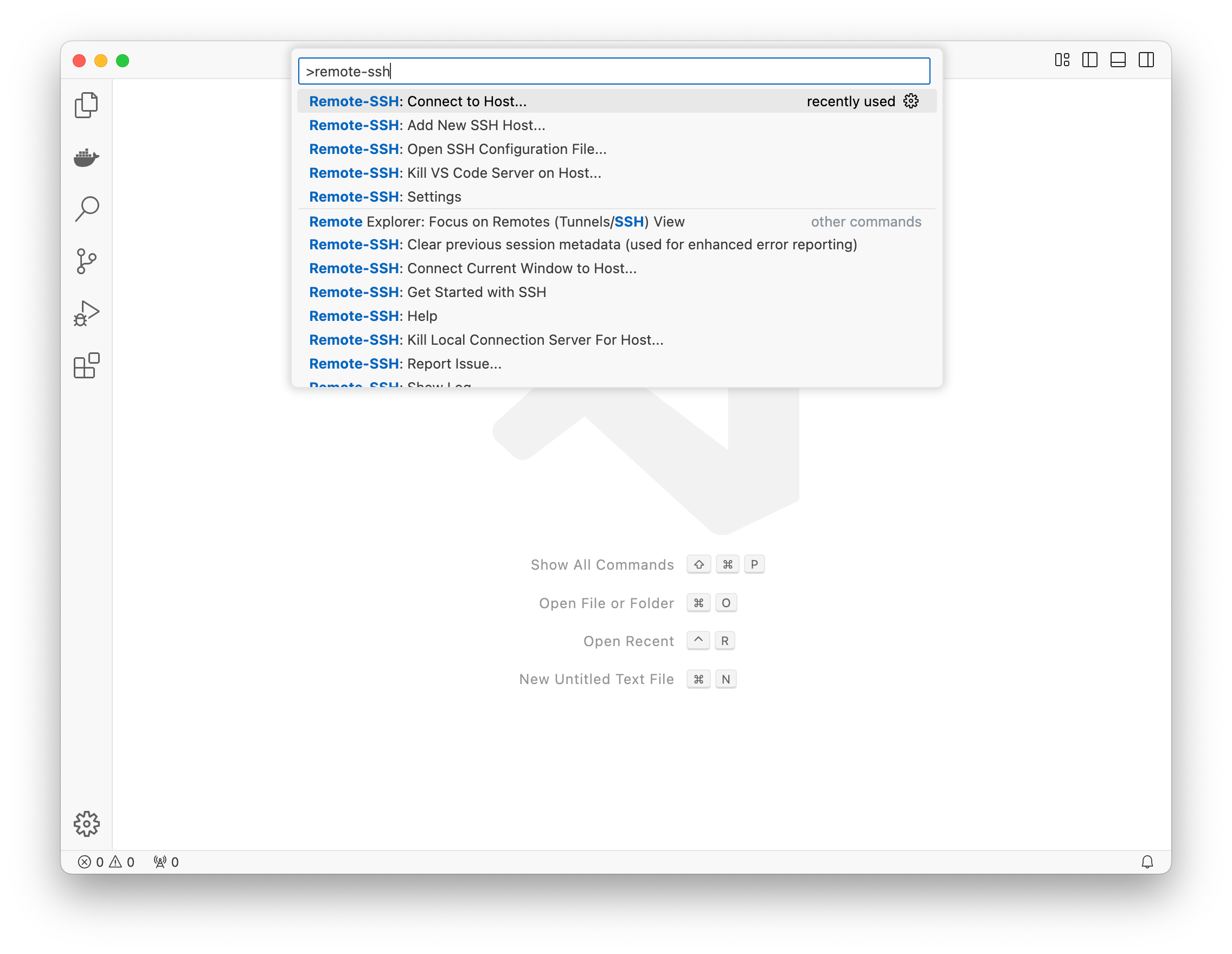
A list of configured SSH profiles will appear. Select the SSH profile identified by the CODE.
You will see an empty VSCode workspace. Click on Open Folder and navigate to the path shared with you. VSCode will prompt you to trust the workspace's folders.
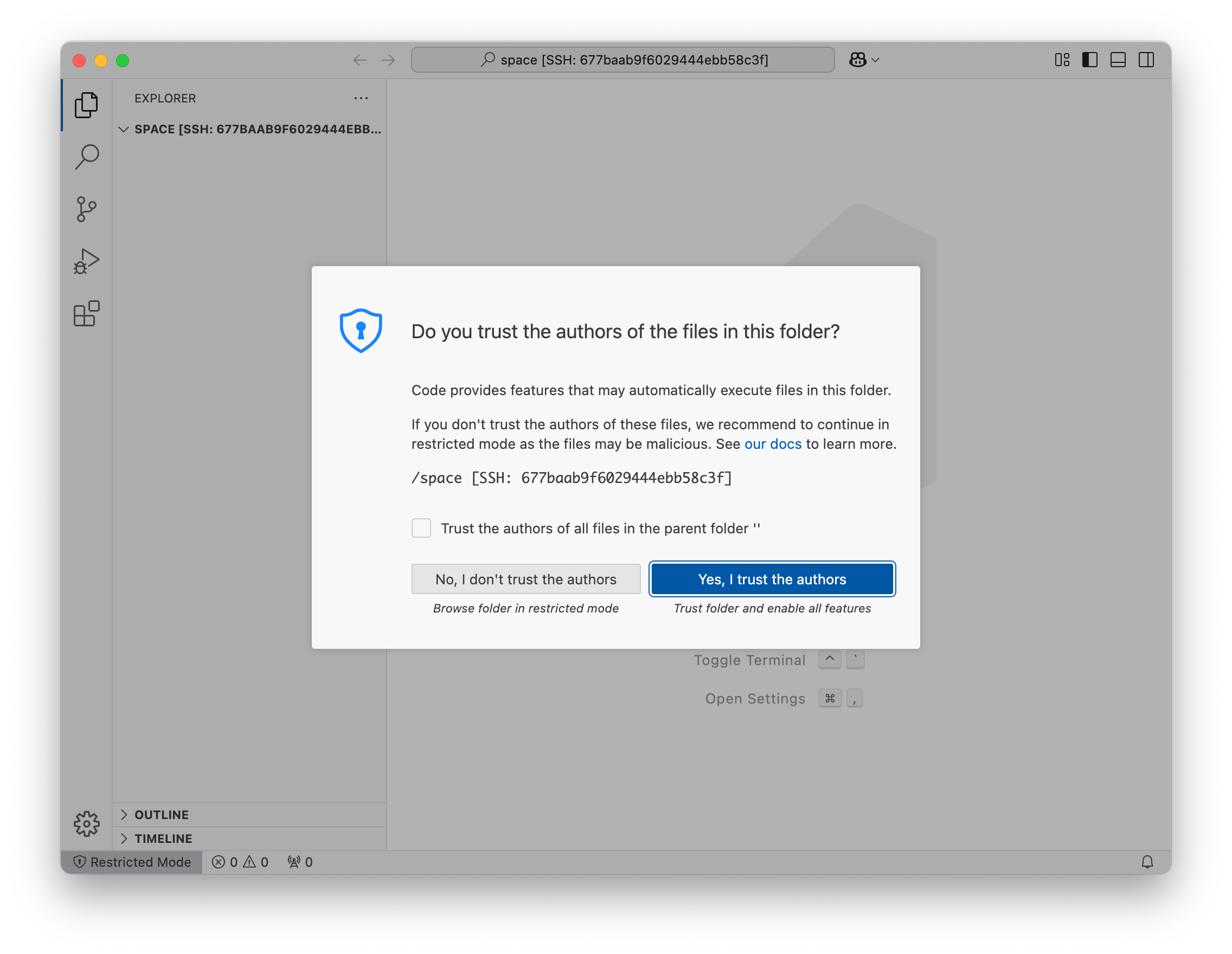
Check the checkbox to trust all files in the parent folder and click Yes, I trust the authors.
Next Steps
You can work together in this Space for an hour before the Space closes automatically. To sign up for PairSpaces, visit PairSpaces.
To learn more about Spaces and how they work, see Spaces.